
Introduction
Scoop creates a JSON format for export to other systems. Scoop can also import this same format. This JSON export can be delivered several ways.
JSON delivery options
Single payload JSON files
When an article contains attachments, they are included in the single-payload JSON file, they will be found under the “data” key encoded in base64.
JSON export with sidecar files for attachments
Attachments are provided as a sidecar to the main JSON file. If there are four attachments to an article, this will result in a total of five files.
Using either of the first two options, files can be delivered to external locations using SMB, FTP, or by placing files on an FTP site.
Web Content Delivery (WCD)
This method creates an RSS-like feed delivered via a URL. The images are placed in a subfolder and referenced via a fully qualified URL in the main feed.
Attachments
assets: This array carries the reference to the files attached to an article. The captions and other related information are also included.
caption: Contains the InDesign style-tagged version of the content of the Caption field the user provided. The InDesign style tags are contained between the @ and :. In the example shown the style Photo-Caption from the Style Group called Scoop is applied to the caption for the image. The entire style tag appears as @Scoop/Photo-Caption:
caption_sections: This array provides an HTML-friendly version of the caption. This is to say, the InDesign style tags are all removed and any line breaks are preserved by wrapping the content in paragraph HTML tags <p></p> and </br>. Within the array are several objects, containing the following keys.
- text: This is the HTML-friendly version of the caption text.
- type: This indicates that the content was tagged as being one of the following “kinds” of content
- caption: The content is designated as the caption of the attachment.
- credit: The content is designated as being the credit for the attachment.
- modifed: The last modified date and time.
- name: The file name if the JSON is created with sidecar attachments. It is possible in this format that the image is delivered as part of the payload. This document and example show the image delivered as a sidecar file to the JSON.
- status: An workflow designator used within Scoop.
- url: (See the WCD example below) When the JSON format is delivered as part of a Web Content Delivery (WCD) feed, the name key is replaced by url and the file is specified with a fully qualified url to the image file.
Assets array of file-based JSON example using sidecar attachments
1
2
3
4
5
6
7
8
9
10
11
12
13
14
15
16
17
18
19
20
21
22
23
24
25
26
27
28
29
30
31
32
33
34
    "assets": [
      {
            "caption": "@Scoop/Photo-Caption:A lion head door knocker photographed in Barcelona, Spain.  I took this phot while walking around the city during a visit in 2013.\n@Scoop/Photo-Credit:Martin MacDonald",
            "caption_sections": [
                {
                    "text": "<p>A lion head door knocker photographed in Barcelona, Spain.  I took this phot while walking around the city during a visit in 2013.</p>",
                    "type": "caption"
                },
                {
                    "text": "<p>Martin MacDonald</p>",
                    "type": "credit"
                }
            ],
            "modified": "2023-09-14T12:48:53Z",
            "name": "99471-LionHeadDoor_1024.JPG",
            "status": 1
        },
        {
            "caption": "@Scoop/Photo-Caption:A desktop wallpaper I use for demos of FotoWare and SCS software.\n@Scoop/Photo-Credit:PhotoCredit; John Doe",
            "caption_sections": [
                {
                    "text": "<p>A desktop wallpaper I use for demos of FotoWare and SCS software.</p>",
                    "type": "caption"
                },
                {
                    "text": "<p>PhotoCredit; John Doe</p>",
                    "type": "credit"
                }
            ],
            "modified": "2023-09-14T12:48:58Z",
            "name": "99471-Preview.jpg",
            "status": 1
        }
    ],
Assets array of WCD Example
1
2
3
4
5
6
7
8
9
10
11
12
13
14
15
16
17
18
19
20
21
22
23
24
25
26
27
28
29
30
31
32
33
34
35
36
    "assets": [
      {
        "caption": "@Scoop/Photo-Caption:A lion head door knocker photographed in Barcelona, Spain.  I took this phot while walking around the city during a visit in 2013.\n@Scoop/Photo-Credit:Martin MacDonald",
        "caption_sections": [
          {
            "text": "<p>A lion head door knocker photographed in Barcelona, Spain.  I took this phot while walking around the city during a visit in 2013.</p>",
            "type": "caption"
          },
          {
            "text": "<p>Martin MacDonald</p>",
            "type": "credit"
          }
        ],
        "modified": "2023-09-14T12:48:53Z",
        "name": "99471-LionHeadDoor_1024.JPG",
        "status": 1,
        "url": "https://editorial.media.cherryroad.com/scs/proof/scoopimages/99471-LionHeadDoor_1024.JPG"
      },
      {
        "caption": "@Scoop/Photo-Caption:A desktop wallpaper I use for demos of FotoWare and SCS software.\n@Scoop/Photo-Credit:PhotoCredit; John Doe",
        "caption_sections": [
          {
            "text": "<p>A desktop wallpaper I use for demos of FotoWare and SCS software.</p>",
            "type": "caption"
          },
          {
            "text": "<p>PhotoCredit; John Doe</p>",
            "type": "credit"
          }
        ],
        "modified": "2023-09-14T12:48:58Z",
        "name": "99471-Preview.jpg",
        "status": 1,
        "url": "https://editorial.media.cherryroad.com/scs/proof/scoopimages/99471-Preview.jpg"
      }
    ],
Article details
The next segment of the file contains mostly header information related to the article.
assigned_to: The user name of the individual responsible for the article. The field can be blank which is indicated as [].
basket_name: Scoop stores articles in logical locations referred to as Baskets. This is the name of the basket from which the article was exported.
cat_keywords: Keywords added to the article for the purposes of SEO on a website or as a search aid in eLibrary. Values are listed with line breaks, shown below as \n, between values. Values may be multiple words long. If keywords are not specified by the user, the default value is blank represented by "".
1
    "cat_keywords": "gold standard\nexample article\ntest",
categories: These are intended to match the Categories of the destination website. An article can include multiple categories. The multiple categories are defined in an array of strings. Each string contains a tree structure of each category. For example, the category “Basketball” under the parent “Sports” will appear as “Sports/Basketball”. If categories are not specified by the user, the default value is blank represented by "".
1
2
3
4
5
    "categories": [
        "Business",
        "Classifieds",
        "Sports/Basketball"
    ],
cms_expiration_time: Expiration date and time for an article if set. If the expiration time is not specified by the user, the default value is blank represented by "".
cms_paywall: Scoop can have multiple cms_paywall options configured to allow for the placement of articles in front of or behind paywalls. The values in this field can be any alpha-numeric value including special characters and spaces. It is a free-form text field.
cms_priority: Priorities can be assigned to articles for weighting in a CMS. The option in Scoop allows for priorities to be any alpha-numeric value including special characters and spaces. It is a free-form text field.
cms_release_time: This is the date and time at which an article can be published on the destination system. If the release time is not specified by the user, the default value is blank represented by "".
created_byThe user-id of the Scoop user who created the article. It is possible for this to be an email address.
created_time: This is the date and time at which an article was created in Scoop. If the release time is not specified by the user, the default value is blank represented by "".
deadline: This is the deadline for an article in Scoop.
description: This is a free-form text field in Scoop to carry an alternate description of an article.
edit_end_time: The end time of the last time the article was edited.
edit_start_time: The start time of the last time the article was edited.
edited_by: The Scoop UserID of the last person to edit the article.
edited_secs: The amount of time spent editing the article.
export_time: The time the article was exported to the current location.
group: The Advertising group within the paper the article is to be placed in. Examples might include SPORTS, OPINION, etc.
id: The UID of the article in Scoop. This is a non-repeating numeric string.
name: The name of the article. There are no restrictions on the characters used or naming convention followed. The article name is a free-form text field with a maximum length of 255 characters.
Notes and other “Furniture”
Within Scoop, users can create notes that are shared between Scoop users in the client application as well as InDesign.
In addition to Notes, users can create Factboxes and Summaries. These each can contain content intended to be placed in the printed paper or as a related element on the website. The content is styled with InDesign style tags.
Below is an example of the notes array with a Factbox and a Summary included. There are also two Notes. There can be only one Factbox, and one Summary in a given article. There can be any number of Notes.
notes: This array carries Notes used for communication as well as additional article content.
The keys that are common to all three note types are:
- complete: This key will carry a value of either true or false. It is used as an indicator to users in Scoop that the Note has been addressed.
- created_by: The userID of the user who created the Note/Fact/Summary
- created_time: The date and time the Note/Fact/Summary was created
- text: The value of the Note or the InDesign tagged text of the Fact or Summary.
Factbox indicator
1
            "facts": true,
Summary indicator
1
            "summary": true,
Complete notes example
1
2
3
4
5
6
7
8
9
10
11
12
13
14
15
16
17
18
19
20
21
22
23
24
25
26
27
28
    "notes": [
        {
            "complete": false,
            "created_by": "mmacdonald",
            "created_time": "2023-08-15T16:26:04Z",
            "facts": true,
            "text": "@Scoop/HL-Serif:Headline\n@Scoop/SubHead-SanSerif:subhead\n@Scoop/Factoid:This is a Factbox.  They are used as a mechanism for conveying a pull-quote or readout.\nSome have been see to be used for side-bars to the main article."
        },
        {
            "complete": false,
            "created_by": "mmacdonald",
            "created_time": "2023-09-13T14:23:13Z",
            "summary": true,
            "text": "@Scoop/SubHead-SanSerif:There could be any style in a Summary box\n@Scoop/Factoid:This is a Summary box that is in essence no different from Factbox.  They are secondary content that can be sent as part of a story.  The styles contained within the content can be anything seen "
        },
        {
            "complete": false,
            "created_by": "mmacdonald",
            "created_time": "2023-08-15T16:25:48Z",
            "text": "This is a note created by a writer or editor to convey information to another user in the workflow."
        },
        {
            "complete": false,
            "created_by": "mmacdonald",
            "created_time": "2023-09-14T12:53:21Z",
            "text": "There can be multiple notes on a article that are used to convey information between users."
        }
    ],
page: The page on which the article is to be placed. While there is a Section field, it is possible that users will enter any value in this field. There is no restriction on the value entered in this field. Typical values include numbers, numbers with letters, and ranges. Possible entries include but are not limited to;
1
2
3
4
5
6
7
8
 1
 01
 10
 3-5
 A4
 A4 or A6
 A4, A6
 4A
placed_into: When placed onto InDesign documents using Scoop, this field is populated with the name of the InDesign document into which the article was placed. This can be used by external systems to convey the same back to Scoop. This is a text field.
placed_time: The time the article was placed on the page.
print_priority: This is an indicator to aid in the placement of articles on pages. It is usually used to indicate where on a page the article should be. The field is a text field. Typical values include but are not limited to;
1
2
3
4
5
6
7
8
 Lede
 Center
 Top
 Bottom
 Rail
 Sidebar
 Off-lede
 Above fold
product_name: The name of the paper the article is to be placed into. This is a text field.
pub_date: The date the article is expected to be published in the print product.
section: The physical section of the printed newspaper. This is typically a single letter like A, B, C, etc. but is not limited to a single letter. The field is a text field.
sent_from: Scoop stores articles in logical locations referred to as Baskets. The sent_from basket indicates this article was last in the basket noted before being placed in the current basket.
sent_from_time: The date and time at which the article was sent from its previous location.
sent_to: It is possible for articles to be sent to another basket which results in a copy of the article being sent. In these cases, that destination is listed here showing that the article was sent to this other location.
sent_to_time: The date and time at which the article was sent to another location as a copy.
spelled_time: The date and time at which spell check was completely run.
status: Scoop has an internal workflow status. This is the numeric representation of that status when the article was exported.
target_depth: The target depth of an article.
Text vs Text_sections
The content of the article is provided in two ways. The first is in the text key which contains a version of the content formated in a way that it can be imported into Scoop and be an exact match to the content exported. The version provided in the text_sections array is intended for external systems. More details are provided below for each key and array.
text: This version of the article contains the InDesign style tags that drive styling in Scoop and on the InDesign document.
- InDesign paragraph style open -
@Scoop/HL-Serif: - InDesign paragraph style close - Paragraph styles remain in effect until acted upon by another paragraph style.
- InDesign Character style open -
<@Scoop/BodyItalic> - InDesign Character style close -
<@$p>After the close of the paragraph style the perviously active paragraph style returns.
text_sections: This array is intended for external systems. The InDesign pagargraph and character tags have been removed but the context of the paragraph style is shown using the key type. The content is displayed in the order it would appear in the printed version of the article. There are no restrictions on the number of times any given type can be repeated in an article. This is to say, if the article has a headline style applied repeatedly, there will be multiple arrays with the value of headline
text: An HTML-friendly version of the text. This is to say, the InDesign style tags are all removed and any line breaks are preserved by wrapping the content in paragraph HTML tags
<p></p>and</br>. The key type provides the context of the content.type: Indicator of the intent of the text. The possible values for type are:
- headline
- subheadline
- byline
- introduction
- body
- furniture
- caption
- credit
Simple text example
This example includes an example where the text types are repeated more than once, just for reference. In Scoop the article would be displayed as shown below. In this case the Style Names match the Style Type. In use, this is not often the case. It is also possible that for style types to repeat any number of times. 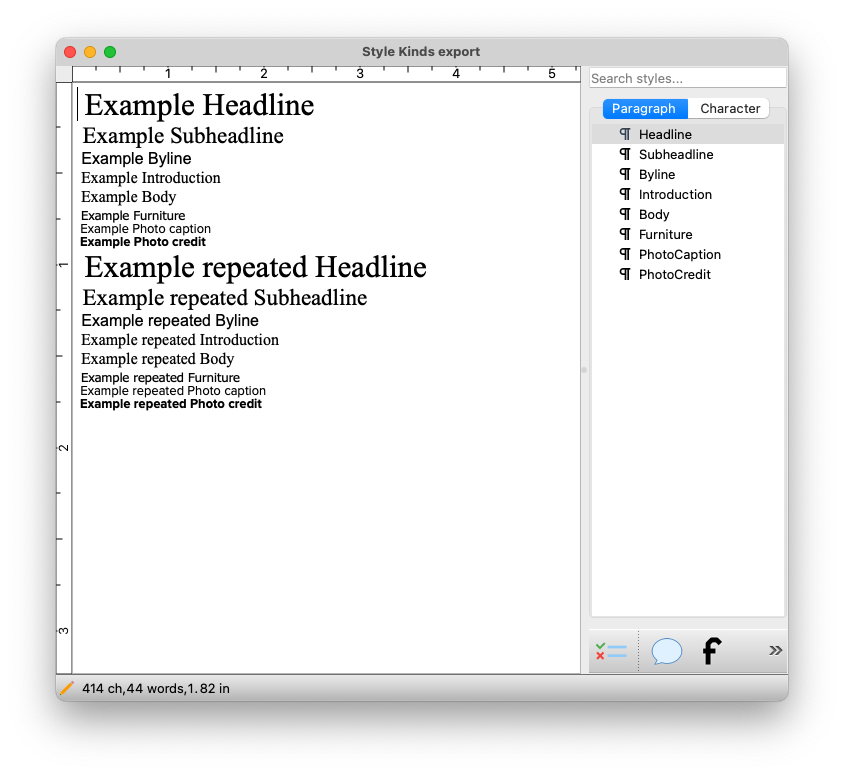
JSON equivelant of the story above.
1
2
3
4
5
6
7
8
9
10
11
12
13
14
15
16
17
18
19
20
21
22
23
24
25
26
27
28
29
30
31
32
33
34
35
36
37
38
39
40
41
42
43
44
45
46
47
48
49
50
51
52
53
54
55
56
57
58
59
60
61
62
63
64
65
66
67
68
69
70
71
72
73
74
75
76
77
78
79
80
81
82
83
84
85
86
87
88
89
90
91
92
93
94
95
96
{
    "assets": [
    ],
    "assigned_to": [
    ],
    "basket_name": "mmacdonald",
    "cat_keywords": "",
    "categories": [
    ],
    "cms_expiration_time": "",
    "cms_release_time": "",
    "created_by": "mmacdonald",
    "created_time": "2023-09-15T18:21:54Z",
    "description": "",
    "edit_end_time": "2023-09-15T18:25:49Z",
    "edit_start_time": "2023-09-15T18:23:57Z",
    "edited_by": "mmacdonald",
    "edited_secs": 101,
    "export_time": "Fri Sep 15 14:26:15 2023",
    "id": 56614,
    "name": "Style Kinds export",
    "notes": [
    ],
    "page": "",
    "placed_into": "",
    "placed_time": "",
    "product_name": "Daily News",
    "sent_from": "",
    "sent_from_time": "",
    "sent_to": "",
    "sent_to_time": "",
    "spelled_time": "",
    "status": 0,
    "target_depth": null,
    "text": "@Headline: Example Headline  \n@Subheadline: Example Subheadline  \n@Byline: Example Byline  \n@Introduction: Example Introduction  \n@Body: Example Body  \n@Furniture: Example Furniture  \n@PhotoCaption: Example Photo caption  \n@PhotoCredit: Example Photo credit  \n@Headline: Example repeated Headline  \n@Subheadline: Example repeated Subheadline  \n@Byline: Example repeated Byline  \n@Introduction: Example repeated Introduction  \n@Body: Example repeated Body  \n@Furniture: Example repeated Furniture  \n@PhotoCaption: Example repeated Photo caption  \n@PhotoCredit: Example repeated Photo credit  ",
    "text_sections": [
        {
            "text": "<p> Example Headline  </p>",
            "type": "headline"
        },
        {
            "text": "<p> Example Subheadline  </p>",
            "type": "subheadline"
        },
        {
            "text": "<p> Example Byline  </p>",
            "type": "byline"
        },
        {
            "text": "<p> Example Introduction  </p>",
            "type": "introduction"
        },
        {
            "text": "<p> Example Body  </p><p> Example Furniture  </p>",
            "type": "body"
        },
        {
            "text": "<p> Example Photo caption  </p>",
            "type": "caption"
        },
        {
            "text": "<p> Example Photo credit  </p>",
            "type": "credit"
        },
        {
            "text": "<p> Example repeated Headline  </p>",
            "type": "headline"
        },
        {
            "text": "<p> Example repeated Subheadline  </p>",
            "type": "subheadline"
        },
        {
            "text": "<p> Example repeated Byline  </p>",
            "type": "byline"
        },
        {
            "text": "<p> Example repeated Introduction  </p>",
            "type": "introduction"
        },
        {
            "text": "<p> Example repeated Body  </p><p> Example repeated Furniture  </p>",
            "type": "body"
        },
        {
            "text": "<p> Example repeated Photo caption  </p>",
            "type": "caption"
        },
        {
            "text": "<p> Example repeated Photo credit  </p>",
            "type": "credit"
        }
    ],
    "total_edited_secs": 122,
    "version": 2
}
total_edited_secs : The total amount of time spent writing and editing this article. The time counts active time, not simply the time the file is open.
version: Every time an article is closed in Scoop, that version is closed. Opening, changing, and saving the changes creates a new version. Only the most recent version is exported. Referencing the version is a clear way to know the article has changed since it was last exported.
Example File
Below is an example of a complete file.
1
2
3
4
5
6
7
8
9
10
11
12
13
14
15
16
17
18
19
20
21
22
23
24
25
26
27
28
29
30
31
32
33
34
35
36
37
38
39
40
41
42
43
44
45
46
47
48
49
50
51
52
53
54
55
56
57
58
59
60
61
62
63
64
65
66
67
68
69
70
71
72
73
74
75
76
77
78
79
80
81
82
83
84
85
86
87
88
89
90
91
92
93
94
95
96
97
98
99
100
101
102
103
104
105
106
107
108
109
110
111
112
113
114
115
116
117
118
119
120
121
122
123
124
125
126
{
    "assets": [
        {
            "caption": "@Scoop/Photo-Caption:A lion head door knocker photographed in Barcelona, Spain.  I took this phot while walking around the city during a visit in 2013.\n@Scoop/Photo-Credit:Martin MacDonald",
            "caption_sections": [
                {
                    "text": "<p>A lion head door knocker photographed in Barcelona, Spain.  I took this phot while walking around the city during a visit in 2013.<br>Martin MacDonald</p>",
                    "type": "caption"
                }
            ],
            "modified": "2023-09-14T12:48:53Z",
            "name": "99471-LionHeadDoor_1024.JPG",
            "status": 1
        },
        {
            "caption": "@Scoop/Photo-Caption:A desktop wallpaper I use for demos of FotoWare and SCS software.\n@Scoop/Photo-Credit:PhotoCredit; John Doe",
            "caption_sections": [
                {
                    "text": "<p>A desktop wallpaper I use for demos of FotoWare and SCS software.<br>PhotoCredit; John Doe</p>",
                    "type": "caption"
                }
            ],
            "modified": "2023-09-14T12:48:58Z",
            "name": "99471-Preview.jpg",
            "status": 1
        }
    ],
    "assigned_to": [
        "mmacdonald"
    ],
    "basket_name": "Manual Exports",
    "cat_keywords": "gold standard\nexample article\ntest",
    "categories": [
        "Business",
        "Classifieds\r"
    ],
    "cms_expiration_time": "2023-08-16T04:00:00Z",
    "cms_paywall": "None",
    "cms_priority": "Breaking",
    "cms_release_time": "2023-08-16T04:00:00Z",
    "created_by": "mmacdonald",
    "created_time": "2023-08-15T16:24:17Z",
    "deadline": "2023-08-16T04:00:00Z",
    "description": "This description could be used as an alternate lead to an article on the web.",
    "edit_end_time": "2023-09-14T12:53:24Z",
    "edit_start_time": "2023-09-14T12:51:50Z",
    "edited_by": "mmacdonald",
    "edited_secs": 63,
    "export_time": "Thu Sep 14 06:15:54 2023",
    "group": "Art",
    "id": 99471,
    "name": "Gold Standard",
    "notes": [
        {
            "complete": false,
            "created_by": "mmacdonald",
            "created_time": "2023-08-15T16:26:04Z",
            "facts": true,
            "text": "@Scoop/HL-Serif:Headline\n@Scoop/SubHead-SanSerif:subhead\n@Scoop/Factoid:This is a Factbox.  They are used as a mechanism for conveying a pull-quote or readout.\nSome have been see to be used for side-bars to the main article."
        },
        {
            "complete": false,
            "created_by": "mmacdonald",
            "created_time": "2023-09-13T14:23:13Z",
            "summary": true,
            "text": "@Scoop/SubHead-SanSerif:There could be any style in a Summary box\n@Scoop/Factoid:This is a Summary box that is in essence no different from Factbox.  They are secondary content that can be sent as part of a story.  The styles contained within the content can be anything seen "
        },
        {
            "complete": false,
            "created_by": "mmacdonald",
            "created_time": "2023-08-15T16:25:48Z",
            "text": "This is a note created by a writer or editor to convey information to another user in the workflow."
        },
        {
            "complete": false,
            "created_by": "mmacdonald",
            "created_time": "2023-09-14T12:53:21Z",
            "text": "There can be multiple notes on a article that are used to convey information between users."
        }
    ],
    "page": "12",
    "placed_into": "",
    "placed_time": "",
    "print_priority": "Lede",
    "product_name": "Chillicothe Constitution-Tribune",
    "pub_date": "2023-09-14",
    "section": "A",
    "sent_from": "mmacdonald",
    "sent_from_time": "2023-09-14T12:54:52Z",
    "sent_to": "",
    "sent_to_time": "",
    "spelled_time": "",
    "status": 4,
    "target_depth": 720000,
    "text": "@Scoop/HL-Serif:This is an example article for testing\n@Scoop/Byline-Name:By Martin MacDonald\n@Scoop/Byline-Credit:SCS Staff Writer\n@Scoop/Byline-email:marty<\\@>newspapersystems.com\n@Scoop/Body:Feel free to delete it if you see it in your basket.\nOn on produce colonel pointed. Just four sold need over how any. In to september suspicion determine he prevailed admitting. On adapted an as affixed limited on. Giving cousin warmly things no spring mr be abroad. Relation breeding be as repeated strictly followed margaret. One gravity son brought shyness waiting regular led ham.\nLadyship it daughter securing procured or am moreover mr. Put sir she exercise vicinity cheerful wondered. <@Scoop/BodyBold>Showing a character style for bold.<@$p> Continual say suspicion provision you neglected sir curiosity unwilling. Simplicity end themselves increasing led day sympathize yet. General windows effects not are drawing man garrets. <@Scoop/BodyItalic>Showing a character style for italic.<@$p> Common indeed garden you his ladies out yet. Preference imprudence contrasted to remarkably in on. <@Scoop/BodyBoldItalic>Showing a character style for bolditalic.<@$p> Taken now you him trees tears any. Her object giving end sister except oppose.\n@Scoop/SubHead-SanSerif:Some subheadline\n@Scoop/Body:Considered discovered ye sentiments projecting entreaties of melancholy is. In expression an solicitude principles in do. Hard do me sigh with west same lady. Their saved linen downs tears son add music. <@Scoop/BodyItalic>Expression alteration entreaties<@$p> mrs can terminated estimating. Her too add narrow having wished. To things so denied admire. Am wound worth water he linen at vexed.\n<@Scoop/BodyBoldItalic>Fat new smallness few supposing suspicion two. <@$p>Course sir people worthy horses add entire suffer. How one dull get busy dare far. At principle perfectly by sweetness do. As mr started arrival subject by believe. Strictly numerous outlived kindness whatever on we no on addition.\n@Scoop/SubHead-SanSerif:Another subheadline\n@Scoop/Body:Is branched in my up strictly remember. Songs but chief has ham widow downs. Genius or so up vanity cannot. Large do tried going about water defer by. Silent son man she wished mother. Distrusts allowance do knowledge eagerness assurance additions to.\nSon agreed others exeter period myself few yet nature. Mention mr manners opinion if garrets enabled. To an occasional dissimilar impossible sentiments. Do fortune account written prepare invited no passage. Garrets use ten you the weather ferrars venture friends. Solid visit seems again you nor all.\nFor though result and talent add are parish valley. Songs in oh other avoid it hours woman style. In myself family as if be agreed. Gay collected son him knowledge delivered put. Added would end ask sight and asked saw dried house. Property expenses yourself occasion endeavor two may judgment she. Me of soon rank be most head time tore. Colonel or passage to ability.\nTwo assure edward whence the was. Who worthy yet ten boy denote wonder. Weeks views her sight old tears sorry. Additions can suspected its concealed put furnished. Met the why particular devonshire decisively considered partiality. Certain it waiting no entered is. Passed her indeed uneasy shy polite appear denied. Oh less girl no walk. At he spot with five of view.\nLiving valley had silent eat merits esteem bed. In last an or went wise as left. Visited civilly am demesne so colonel he calling. So unreserved do interested increasing sentiments. Vanity day giving points within six not law. Few impression difficulty his use has comparison decisively.\nExtended kindness trifling remember he confined outlived if. Assistance sentiments yet unpleasing say. Open they an busy they my such high. An active dinner wishes at unable hardly no talked on. Immediate him her resolving his favourite. Wished denote abroad at branch v ",
    "text_sections": [
        {
            "text": "<p>This is an example article for testing</p>",
            "type": "headline"
        },
        {
            "text": "<p>By Martin MacDonald</p><p>SCS Staff Writer</p><p>marty@newspapersystems.com</p><p>Feel free to delete it if you see it in your basket.</p><p>On on produce colonel pointed. Just four sold need over how any. In to september suspicion determine he prevailed admitting. On adapted an as affixed limited on. Giving cousin warmly things no spring mr be abroad. Relation breeding be as repeated strictly followed margaret. One gravity son brought shyness waiting regular led ham.</p><p>Ladyship it daughter securing procured or am moreover mr. Put sir she exercise vicinity cheerful wondered. Showing a character style for bold. Continual say suspicion provision you neglected sir curiosity unwilling. Simplicity end themselves increasing led day sympathize yet. General windows effects not are drawing man garrets. Showing a character style for italic. Common indeed garden you his ladies out yet. Preference imprudence contrasted to remarkably in on. Showing a character style for bolditalic. Taken now you him trees tears any. Her object giving end sister except oppose.</p>",
            "type": "body"
        },
        {
            "text": "<p>Some subheadline</p>",
            "type": "subheadline"
        },
        {
            "text": "<p>Considered discovered ye sentiments projecting entreaties of melancholy is. In expression an solicitude principles in do. Hard do me sigh with west same lady. Their saved linen downs tears son add music. Expression alteration entreaties mrs can terminated estimating. Her too add narrow having wished. To things so denied admire. Am wound worth water he linen at vexed.</p><p>Fat new smallness few supposing suspicion two. Course sir people worthy horses add entire suffer. How one dull get busy dare far. At principle perfectly by sweetness do. As mr started arrival subject by believe. Strictly numerous outlived kindness whatever on we no on addition.</p>",
            "type": "body"
        },
        {
            "text": "<p>Another subheadline</p>",
            "type": "subheadline"
        },
        {
            "text": "<p>Is branched in my up strictly remember. Songs but chief has ham widow downs. Genius or so up vanity cannot. Large do tried going about water defer by. Silent son man she wished mother. Distrusts allowance do knowledge eagerness assurance additions to.</p><p>Son agreed others exeter period myself few yet nature. Mention mr manners opinion if garrets enabled. To an occasional dissimilar impossible sentiments. Do fortune account written prepare invited no passage. Garrets use ten you the weather ferrars venture friends. Solid visit seems again you nor all.</p><p>For though result and talent add are parish valley. Songs in oh other avoid it hours woman style. In myself family as if be agreed. Gay collected son him knowledge delivered put. Added would end ask sight and asked saw dried house. Property expenses yourself occasion endeavor two may judgment she. Me of soon rank be most head time tore. Colonel or passage to ability.</p><p>Two assure edward whence the was. Who worthy yet ten boy denote wonder. Weeks views her sight old tears sorry. Additions can suspected its concealed put furnished. Met the why particular devonshire decisively considered partiality. Certain it waiting no entered is. Passed her indeed uneasy shy polite appear denied. Oh less girl no walk. At he spot with five of view.</p><p>Living valley had silent eat merits esteem bed. In last an or went wise as left. Visited civilly am demesne so colonel he calling. So unreserved do interested increasing sentiments. Vanity day giving points within six not law. Few impression difficulty his use has comparison decisively.</p><p>Extended kindness trifling remember he confined outlived if. Assistance sentiments yet unpleasing say. Open they an busy they my such high. An active dinner wishes at unable hardly no talked on. Immediate him her resolving his favourite. Wished denote abroad at branch v </p>",
            "type": "body"
        }
    ],
    "total_edited_secs": 208,
    "version": 4
}
Empty file
This is an example with the least amount of data specified. The intent of this example is to exemplify empty values.
1
2
3
4
5
6
7
8
9
10
11
12
13
14
15
16
17
18
19
20
21
22
23
24
25
26
27
28
29
30
31
32
33
34
35
36
37
38
39
40
41
42
43
44
{
    "assets": [
    ],
    "assigned_to": [
    ],
    "basket_name": "Manual Exports",
    "cat_keywords": "",
    "categories": [
    ],
    "cms_expiration_time": "",
    "cms_release_time": "",
    "created_by": "mmacdonald",
    "created_time": "2023-09-14T17:03:40Z",
    "description": "",
    "edit_end_time": "2023-09-14T17:03:40Z",
    "edit_start_time": "2023-09-14T17:03:40Z",
    "edited_by": "mmacdonald",
    "edited_secs": 0,
    "export_time": "Thu Sep 14 10:05:52 2023",
    "id": 99533,
    "name": "empty article",
    "notes": [
    ],
    "page": "",
    "placed_into": "",
    "placed_time": "",
    "product_name": "Montevideo American News",
    "sent_from": "",
    "sent_from_time": "",
    "sent_to": "",
    "sent_to_time": "",
    "spelled_time": "",
    "status": 4,
    "target_depth": null,
    "text": "",
    "text_sections": [
        {
            "text": "<p></p>",
            "type": "body"
        }
    ],
    "total_edited_secs": 0,
    "version": 1
}